[Guide] Special Announce Sound Config - DeadlyBossMods/DBM-Retail GitHub Wiki
This article should show you how to customize your DBM sound experience to be more effective in dungeons/raids.
First up, global special warning settings. Here is what your main special warning sound option window looks like. You get to this window by doing "/DBM" slash in chat frame, then clicking "Options" then "Special Warning Options"
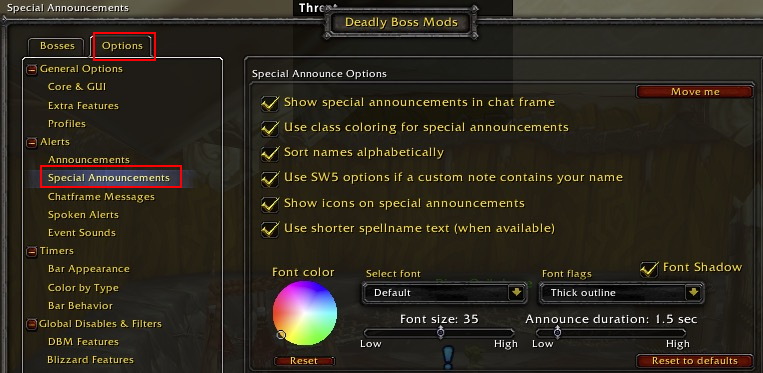
Here you can configure all sorts of options.
Now, if you scroll down further, you can configure each special warning type. Remember. type 1 is generic warning (such as GTFO) or "debuff on you". Type 2 is aoe warning such as "aoe damage incoming", "aoe fear incoming" etc that are important but not something that is individual responsiblity and more of a watch out warning. Type 3 is the VERY Important warning that means "do this or you're going to die" or "this is a raid wiping mechanic if you don't interrupt/do this". Type 4 is the "run away" type that means "you need to run and keep running to get/stay safe". Type 5 is the type that only fires if you enter your name into the Notes Feature (https://github.com/DeadlyBossMods/DeadlyBossMods/wiki/%5BGuide%5D-Notes). Each type has it's own flash, sound, and repeat options. Below you can see these options.
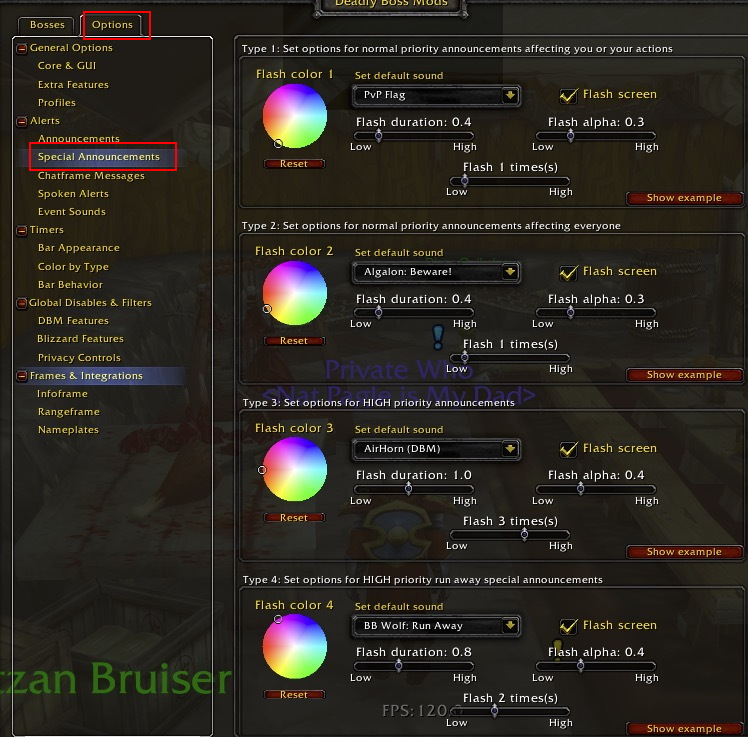
I highlight the sounds in particular since many users don't realize that these global settings can be changed globally and again have been changing them per mod per warning which is grossly inefficient way of customizing DBM.
Now, onto more advanced special warning config. Per special warning per mod sound config. This was meant for customizing specific warnings to be personal to you. Maybe you are doing a fight like Mythic KJ and there are a lot of aoe warning a lot of personal warnings and more than one instant raid wipe mechanic. So same "beware" etc sounds for each of 5 warning types isn't enough. This is when you want to customize at the mod level instead of global level.
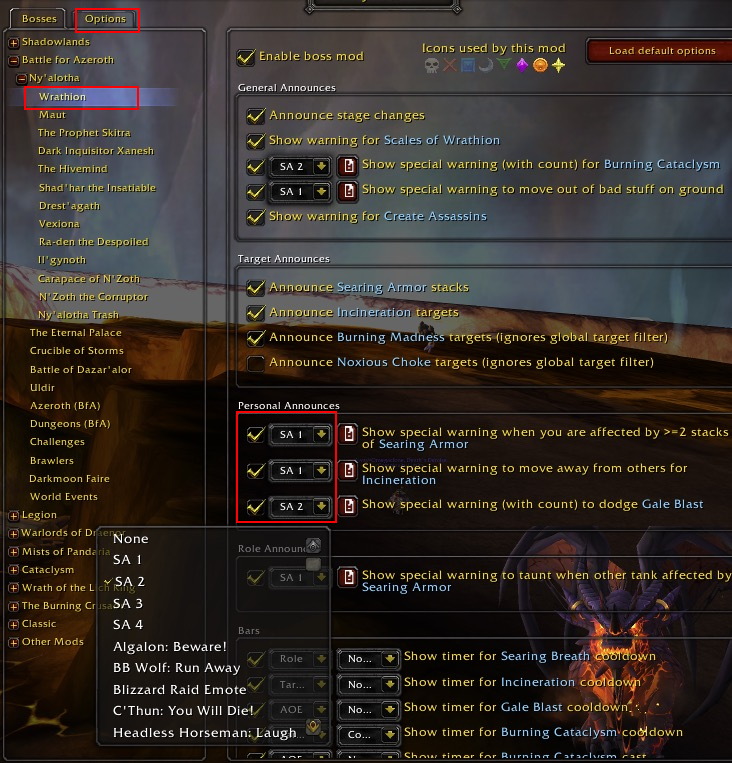
Demo
https://www.youtube.com/embed/6V_ut-tczDk
FAQ
When will this feature be available?
Now! It's been available since May 2013.
Why do we have an enable/disable for a feature like this?
It's a pretty complex feature and one that certainly clutters ui up. It may be more than what some users desire of their UI.
How to Enable?
This feature is always available.
How to Disable?
It can no longer be disabled. It's on for all to stay.
Why do I only see 5 sound options?
Something is wrong with LibSharedMedia. Since this is now packaged into DBM, this should no longer happen. Report a bug on DBM forums if you cannot get it to show more than sounds "SW1", "SW2", "SW3", "SW4", and "SW5"
Why do I not hear my sound?
It's possible you selected a sound that is no longer on your system. Basically, you have an invalid sound selected in your special warning now. Make sure a valid sound is selected in your special warning.
Why do sound names differ on different characters/accounts.?
The DBM duplicate filter removes duplicate sound paths so whatever addon is first mod to register a name with LibSharedmedia for sound file is one that wins. Some mods try to use consistent naming to ensure it lines up regardless of which mod registers first. Other mods like to name stuff different though. For example, on my paladin, clcinfo is earlier in alphabet so it registers "explosion" and "you will die" with "clcinfo" in name before Omen or DBM can register better names for them. As far as functionality is concerned though, the correct sound will play regardless of what name won out in the sound list.